
Building an Android interface that looks flawless across thousands of devices is, in itself, a considerable challenge. But ensuring that every analytics event and every internal interaction is recorded exactly when it should be is an even more complex task. In that context, there’s a need for a tool that not only verifies how the app looks, but also how it behaves under the hood—and that’s where Android Snaptesting comes in.
The Android Snaptesting library, developed by Telefónica, provides two powerful snapshot testing approaches for Android: screenshot tests and log tests. It allows you to capture and compare visual snapshots of the user interface to detect unexpected design regressions. In addition, it offers the ability to capture and compare analytics events or application logs to ensure tracking consistency across different test runs. Both approaches follow the same ‘snapshot’ concept: record an initial baseline and verify it automatically in subsequent tests.
The library is designed to integrate easily with existing test suites and supports execution both from the IDE and from the command line, maintaining consistent behavior across all environments.
A key advantage is that, unlike other screenshot testing libraries, it can be used in combination with Marathon, a well-known test runner that enables parallelization of test execution, among other features. It achieves this because there’s no need to run a new Gradle task; it’s enough to execute the default task used to launch UI tests, “connectedDebugAndroidTest”. All comparisons—both images and logs—are performed during test execution, on the device where the tests are running.
When you want to generate a new baseline, you simply need to pass the argument “-Pandroid.testInstrumentationRunnerArguments.record=true” to the Gradle task.
Integration is straightforward: just add the plugin “com.telefonica.androidsnaptesting-plugin” and the library “com.telefonica:androidsnaptesting” to the Gradle project to use the corresponding rules in instrumentation tests. For UI tests, use “ScreenshotsRule”, which allows you to capture and compare the UI. For log tests, use “LogsRule”, which compares the output generated by the configured log collector.
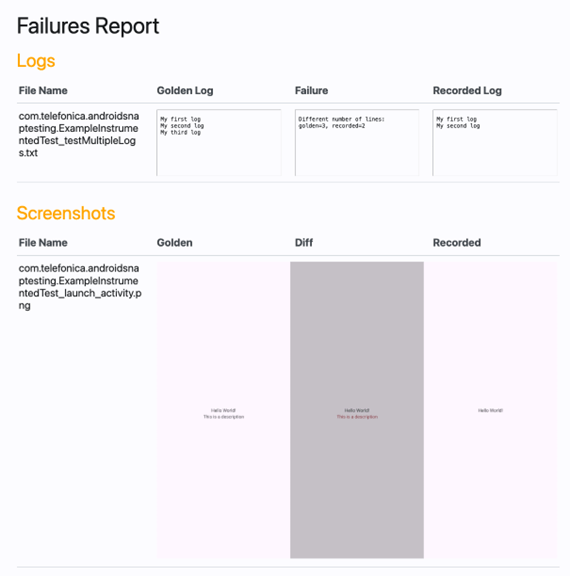
Once the tests have run, the library generates its own HTML report where you can view any failures, including the differences between what was expected and what was found.
You can find all the detailed documentation in the library’s GitHub repository.